Amazon listing claim check
Catch risky listing claims before you publish.
Paste your listing. CopyForge highlights risky health, antimicrobial and ranking wording, explains why it was flagged and links the policy source. Free, no signup.
02 / Review desk
Find the phrase. Read the source.
Run the real Amazon listing scan to see exact matches, severity, context and policy receipts. Your text stays editable; each new check replaces the last result.
Ruleset v2026.11.01, reviewed 1 November 2026. Checks wording, not facts. Not legal advice or Amazon approval.
Choose your Amazon listing check
Check wording risk, title quality or field limits with the tool that fits your task. Each check explains what it covers and what still needs your review.
Amazon listing compliance checker
Find risky claim wording and review the matched phrase, severity and policy source. No signup; public daily limits apply.
Amazon title checker
Review title length, repeated words and promotional wording. Runs in your browser without an account.
Amazon listing limits and byte counter
Measure title and Item Highlights characters, plus backend search-term bytes. Runs in your browser without an account.
Need a new draft? Use the Amazon listing generator with product facts you can support, then review its output before publishing.
What it flags
Flags the claims that get Amazon listings blocked.
Each flag shows the matched phrase, why it is risky, the policy source and a safer next step. Read more in the guides on Amazon prohibited words, prohibited product claims, pesticide and antimicrobial claims and what to do when a listing is removed.
A real scan result
Spot wording that
needs a closer look.
The model is instructed to use your product details. The deterministic scanner checks configured patterns. Neither replaces verification of your product claims.
Illustrative input facts
Stainless steel · 750 ml
A simple bottle brief establishes material and capacity. It supplies no medical benefit or FDA approval.
Wording to question
“This bottle cures dehydration.”
Review the medical claim, remove unsupported wording and recheck. A grounded draft could say: “750 ml stainless steel water bottle.”
Scan listingBrand guard Your approved wording and forbidden words shape the draft. Approval is separate from evidence verification.
Scoped repair A forbidden term triggers a repair attempt for the affected passage, followed by checks. Unresolved findings remain visible.
Account scope Ownership filters and row-level security protect authenticated records. CopyForge does not train its own models on your generations.
Check → Fix → Generate
One product.
Five different jobs.
Check a listing you already have, fix the flagged wording, or draft Amazon titles and bullets, Shopify descriptions, search metadata, ads and emails from the same product details.
Amazon listing
Title up to 75 characters, Item Highlights within 125, up to five bullets, backend keywords under 250 bytes (249 safe max).
Shopify description
Product description plus a meta title up to 60 characters and meta description up to 155.
SEO / AEO / GEO
SEO metadata plus optional AEO direct-answer and GEO entity-summary modes, drafted from the product details you supply.
Meta ads (Facebook & Instagram)
Up to three variants of 125 characters, screened against documented ad-policy wording risks.
Email campaign
Up to four subject lines of 50 characters and an email body with wording-risk checks. Verify sender details, consent and opt-out handling before sending.
Popular seller tools
Start with the tool that fits the job.
- AmazonAmazon Listing Compliance CheckerUse this when you have a full Amazon listing and want every risky phrase, its severity and the policy source.
- AmazonAmazon Listing ScoreUse this when you want one score for a pasted Amazon listing covering claim wording and field limits.
- Any channelProduct Claim CheckerUse this when you want a quick read on health, safety or performance claims in any product copy.
- AmazonAmazon Title CheckerUse this when you only need to check an Amazon title for length, banned characters and promotional words.
- AmazonAmazon Backend Keywords CheckerUse this when you want to confirm backend search terms stay under the byte limit without repeats.
- ShopifyShopify Description CheckerUse this when you want to review a Shopify product description for risky claims before it goes live.
Inside the product
Facts in.
Reviewable copy out.
Explore the channel brief and an actual output example. Select a screen and enlarge it to read the details.
Illustrative facts supplied: Plain white ceramic mug. Capacity 300 ml. Height 9 cm. One mug per box. No certifications, care instructions, origin or performance tests supplied.
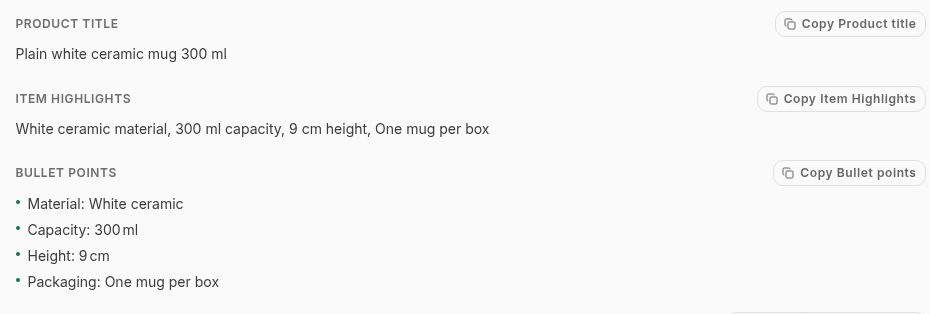
Inspect the title and bullets, copy individual fields and verify every claim before publishing. Select a screen, then enlarge it to read the details.
Why CopyForge
Why not just use a general AI chatbot?
A chatbot can draft a paragraph. CopyForge adds a facts-first workflow, Amazon field limits (titles up to 75 characters in most categories, Item Highlights up to 125, backend search terms under 250 bytes) and a deterministic policy pass that shows the matched phrase and its source. It checks wording, not whether your product facts are true.
Uses the product details you supply
- CopyForge
- Facts-first prompt with a clear instruction not to fill gaps; human verification still required
- General AI chatbot
- Optional — the model may fill gaps unless you constrain it
- Writing by hand
- Yes, when the writer works from your product details and you review the draft.
Policy check before you publish
- CopyForge
- Applicable checks from the 19-rule documented library, with the exact flagged phrase
- General AI chatbot
- Only when prompted, without CopyForge’s deterministic rule pass
- Writing by hand
- The writer’s policy research and review checklist
Consistent brand voice and banned words
- CopyForge
- Attached brand profiles supply approved claims, style guidance and forbidden-term checks
- General AI chatbot
- Guidelines normally need to be supplied in the conversation
- Writing by hand
- Depends on the writer and review process
Current public workflow
- CopyForge
- Single-item generation on Starter; available paid plans add bulk and exports
- General AI chatbot
- Flexible conversation, with output checked and organised manually
- Writing by hand
- Every draft and check is completed manually
Cost
- CopyForge
- Starter: 10 generations per day; available paid plans start at $19/month
- General AI chatbot
- Varies by provider and plan
- Writing by hand
- The writer’s or copywriter’s time
This compares approaches, not named products. Provider capabilities and prices vary; the CopyForge column distinguishes live Starter access from available paid plans.
Core review workflow · included on Starter
The claim is only
half the story.
Keep the product facts, supporting evidence and approved wording together. A pattern score cannot do that work for you.
Product facts
The specifications, materials and warranty terms you supply.
Evidence & claims
Record support for a claim and the wording you allow the draft to reuse.
Readiness review
Inspect missing evidence and claim risks before choosing what goes live.
Catalogue work / paid plans
Bulk CSV
Pro: 200 rows per batch. Agency: 1000. Each product keeps its own facts and review findings.
Handoff / paid plans
Exports
Spreadsheet-ready copy for your publishing workflow. Account privacy exports remain available on every plan.
Automation / Agency
API & webhooks
Connect repeat work to the CopyForge API, with a documented 60-request-per-minute API limit.
Read the API docsPricing shows feature availability by plan.
Start with one product
Make the first
draft count.
Starter includes 10 generations a day and one brand profile. It never converts to a paid plan on its own; no card required. Pro is $19/month; Agency is $49/month.
Done-for-you service · one-time · no subscription
Claim Fix Service: $49 for up to 5 listings
Listing flagged or removed for a claim? We rewrite the risky wording within 48 hours after payment and complete listing text are received and explain every change.
Behind CopyForge AI
Built for everyday
seller workflows.
Learn why CopyForge was built, how the tools work and what their checks can tell you.
About CopyForgeBefore you start
A few useful answers.
What happens to my product data?
Generations stay scoped to your account, and CopyForge does not use them to train a model. You can export or delete your data from the dashboard at any time.
Which channels and marketplaces are covered?
Amazon listings, Shopify product descriptions, SEO/AEO/GEO search-discovery content, Facebook and social ads, and email campaigns — each with its own field structure and policy checks. Marketplace-specific coverage is stated only when it is actually available.
Which languages does it write?
English output today, because the policy rules it checks are written for English-language marketplaces. CopyForge does not advertise language coverage that its policy layer cannot currently support.
Does Starter add branding to the copy I paste into a marketplace?
CopyForge can show its attribution inside the Starter workspace, but clipboard and field copy stays clean so an Amazon or other marketplace field is not given an off-platform CopyForge link. Paid plans also remove the workspace attribution.
Do I need a card to start?
No. Starter gives you 10 generations a day on every channel, and never converts to a paid plan automatically.